Second homes, rentals, investments
Every property, in view.
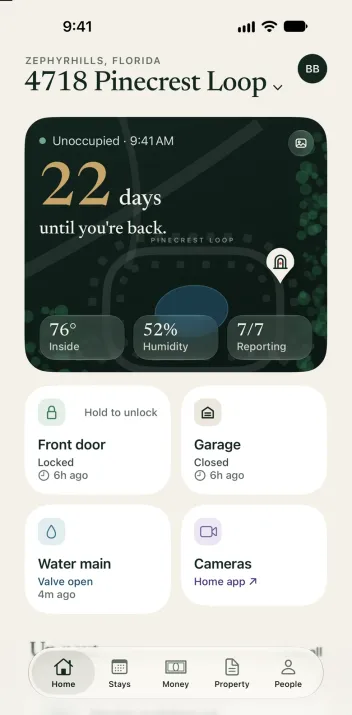
See what your locks, water sensors and caretaker report. Approve every visit with photo proof, and pay in one place.
See what your locks, sensors and caretaker report. Approve visits with photo proof, and pay in one place.
or get a link by email
Free for your first month, then $19 a month per home, one lock included. Cancel before it ends and you pay nothing.
Check your email
- PURVIEWMaria is at the houseChecked in 9:41 AMnow
- PURVIEWFront door lockedMaria locked up at 10:31 AM10:31
- PURVIEWVisit approvedPaid Maria $103.4010:42
- PURVIEWWater reportedKitchen sink · valve closed 4 sec later2:14 AM
- PURVIEWJake & Emily checked outDoor locked · code endedSun
- PURVIEWFlood insurance due$412 on Dec 17Dec 10
Water at 2 AM
2:14 AM. Water under the kitchen sink.
You're asleep, 1,100 miles away. This is what reaches your phone, in the order it was reported.
- 2:14:03 AMKitchen sensor reported water
- 2:14:07 AMMain valve reported closed
- 2:14:10 AMMaria notified
- 7:52 AMMaria checked in at the house · 3 photos
When you're a thousand miles away, "it's fine" isn't an answer.
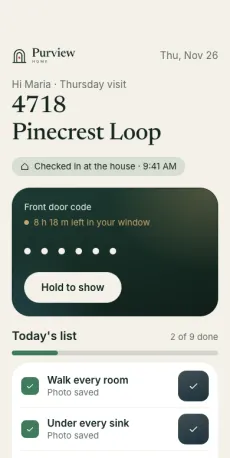
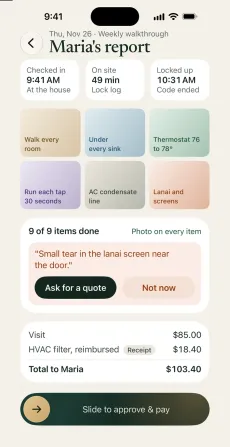
Purview shows what was reported, by whom, and when. Every visit comes with a check-in at the house, a photo for each item and the lock log. You approve it, and it's on file for good.
Every visit comes with a check-in at the house, a photo for each item and the lock log.
How it works
Add your home
Type the address, connect your locks and water sensors, and set your next stay. About ten minutes.
Invite your caretaker
They get a text link. No app. Their door code works only during their visit, and every item needs a photo.
Approve with proof
See the check-in, photos and the lock log. Slide to pay. It's stamped and filed.
The light comes on
Know the moment someone's at the house.
When your caretaker checks in, the light in the mark turns on across your Lock Screen, Dynamic Island and widgets. When they lock up, it goes dark.
Everything about the house, in one calm place.
Visits with photo proof
Every checklist item comes back with a photo and a time.
Codes that expire
Door codes open for the visit window, then close on their own.
•4•8•1•9•2•6Fri 3 PMSun 11 AMWater at 2 AM
Reports reach you step by step, as they happen.
- 2:14:03Kitchen sensor reported water
- 2:14:07Main valve reported closed
- 2:14:10Maria notified
Share the house
Guests get the door, Wi-Fi and house guide for their dates only.
Guest passJake & EmilyDec 11 to Dec 13Door · Wi-Fi · GuideWhat it costs to own
Mortgage, care, utilities and HOA in one honest number.
The house file
Value, loan, insurance and documents, each with its date.
- Homeowners
- Face ID
- Flood
- Face ID
- Loan balance
- $281,400
Your calendar
Stays, visits and bills in the calendar you already use.
Walkthrough · MariaThu, Dec 3 · 9:00 to 10:00 AMPhone and web
An iPhone app for the moment, a desk view for the details.

Share the house
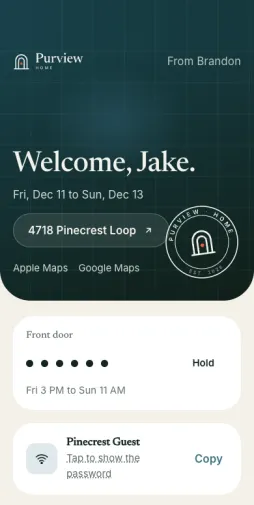
Friends for the weekend. A pass, not a password.
Pick the dates. They get a text with the door code for those days only, the Wi-Fi and your house guide. Cameras and money stay with you.
The door code works for their dates only.
For caretakers and pros
Free for the people who look after homes.
Caretakers, cleaners, pool and lawn pros get the visit, the code and the checklist on their phone, and get paid in the app when the work is approved.
Get the visit, the code and the checklist, and get paid in the app when the work is approved.
Join as a partnerPricing
One price per home. Everyone else is free.
Add a lake house later and it's another $19 a month, with its own free first month. Each home includes one lock, and each extra lock is $3 a month. Caretakers, vendors, family and guests never pay.
$19per home, per month
First month free on every home.
- One lock included
- Unlimited visits, photos and history
- Caretakers, vendors and guests free
- iPhone app and web
- Calendar sync
Each extra lock, $3 a month
Start free monthQuestions, answered.
What is Purview Home?
Purview Home is an app for owners of second homes, rentals and investment properties. It shows what your locks, water sensors and caretaker report, plans visits around your stays, and lets you approve and pay for each visit with photo proof.
Is Purview a monitoring service?
No. Purview is software. It relays what your devices and people report, and when. It is not a monitoring or home watch company, and alerts can be delayed.
What do I need at the house?
A smart lock, and ideally water sensors and a shutoff valve. Purview connects to popular smart home devices; the app shows what you can connect before you buy anything.
How do caretakers get paid?
In the app, straight to their bank, after you approve the visit. Vendors you pay another way can be marked paid.
Do guests need the app?
No. Guests get a text link with their door code, Wi-Fi and house guide for their dates only.
How much does Purview cost?
$19 a month or $190 a year for each home, with one lock included. Each extra lock at a home is $3 a month or $30 a year. Your first month is free, and if you cancel before it ends you pay nothing. Caretakers, vendors and guests never pay.
Can I see visits in my calendar?
Yes. Subscribe to a Purview calendar in the calendar app you already use, or add events to a calendar you choose.

Every property, in view.
or get a link by email
Free for your first month, then $19 a month per home, one lock included. Cancel before it ends and you pay nothing.
Check your email